
Your website loads. The logo looks right. The contact page is still there. None of that answers the question that matters: has the software underneath your website been protected against PHP2Shell?
Falls+Partners and Winfluence are declaring war on PHP2Shell on behalf of small businesses. Owners deserve a clear answer about what is affected, what has been fixed and who is responsible for finishing the work.
In this episode of Winfluence with Jason Falls, I explain the issue without the developer jargon and give you a practical battle plan. Start with the message below. You can send it through your hosting provider’s established support channel today.
Copy and paste: Ask your host to verify PHP2Shell protection
Subject: Please confirm our website’s PHP2Shell protection
Have you addressed both PHP2Shell vulnerabilities on the systems running my website? What fix is in place, when was it applied, and what action remains? Please confirm protection against CVE-2026-109618 and CVE-2026-109619, identifying the fixed PHP package or documented vendor security update. Please confirm the protected software is actually serving our website and any required restarts are complete.
Please include our main website, subdomains, staging and test sites, old installations still online, and separately hosted tools. Identify anything outside your responsibility. Have you reviewed PHP’s October 23 follow-up advisory, and does our setup require additional action? If any protection is temporary, please explain what remains to be patched, who owns that work and when it will be completed.
Please tell us whether you found signs of possible compromise, what checks you performed and whether investigation remains. Confirm who will test our forms, bookings, checkout and confirmation emails after the work. Please identify any action we need to take and who will verify completion. We need your response in plain language, in writing.
Download the Falls+Partners PHP2Shell Website Protection Checklist (PDF, 3 pages). Keep it with your provider’s response and record the owner, evidence and remaining work.
Watch or listen: Declaring War on PHP2Shell
What is PHP2Shell, in plain language?
PHP2Shell is the name used for two critical PHP security flaws that can allow an attacker to run instructions on an affected server without logging in, under certain conditions. PHP released security fixes on October 21, 2026. A weakness does not establish that your site has been compromised, but waiting for visible damage is a poor maintenance plan.
See PHP’s official advisories and current update guidance. Your host should confirm the fix appropriate to your actual server, including relevant follow-up guidance.
What runs your website? WordPress, PHP and the parts behind the page
Your website is a set of connected components. Understanding the roles helps you ask the right person for help.
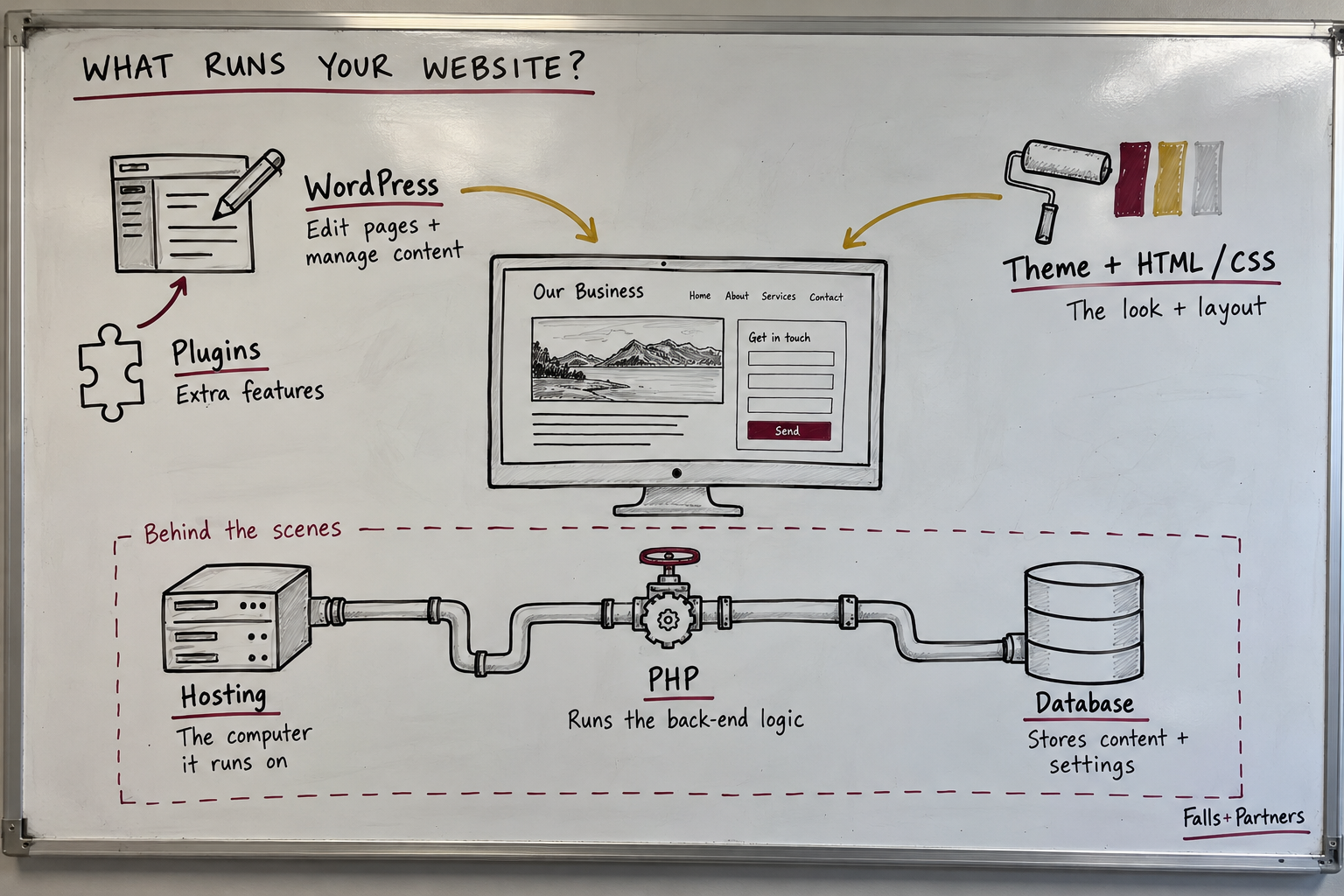
- WordPress, Drupal or Joomla: a content management system helps manage pages and content. It also contains application behavior; WordPress is more than a visual theme.
- Themes, HTML and CSS: these shape the page structure, appearance and layout customers see. Browser JavaScript can add interactive behavior.
- PHP: executes server-side application logic. In a typical WordPress setup, it helps turn requests and stored content into a response.
- Plugins and extensions: add functions, such as forms and ecommerce, and need their own maintenance.
- The database: stores content and settings.
- Hosting: provides the computing environment where the server-side components run.
Think of a restaurant: a beautiful dining room doesn’t tell you whether the kitchen equipment has been repaired. Updating WordPress alone likewise does not establish that the PHP runtime has been patched.
Does this affect WordPress, Drupal, Joomla or Shopify?
For a PHP-based site on your own hosting account, start with the hosting provider and the person maintaining the site. Have them coordinate rather than sending you back and forth.
WordPress.com has published a specific protection notice for the hosting services it names. That is different from assuming every site built with WordPress has the same protection.
Standard Shopify stores include hosting; merchants do not patch the core platform’s server software themselves. Check official communications and ask separately about connected blogs, custom apps or other externally hosted tools.
Your three-step battle plan
- Find the owner. Name the person responsible for hosting security updates and the person maintaining the website. Include forgotten installations still online.
- Confirm the fix. Get the protected package or official provider notice in writing, with coverage and any exclusions. Some vendors backport fixes, so a displayed version alone may not settle the question.
- Verify the result. Confirm required restarts and test forms, bookings, checkout and emails. Working business functions do not prove the absence of compromise.
What if my host says a firewall is enough?
Ask whether the underlying software has been patched or whether the firewall is a temporary measure. PHP’s maintainers say partial mitigations do not replace updating. Ask for a containment plan, a named owner and a completion time if the permanent fix remains outstanding.
What if the site is old or somebody already got in?
Have the technical team preserve a backup, check compatibility and test promptly. An outdated extension may need to be updated, replaced or removed. You do not automatically need a new website, but you need a maintained environment.
Unexpected administrator accounts, redirects or suspicious changes need qualified investigation. Patching a weakness and recovering from compromise are separate jobs. Repairing the lock doesn’t establish whether someone already got inside.
Need a straight answer? Contact Falls+Partners.
Your website is part of your livelihood: the appointment that fills tomorrow’s calendar, the order that helps pay an employee, the first impression you do not get to make twice. You deserve clear ownership and verified action.
If the answer comes back as a wall of jargon—or you cannot get an answer—contact Falls+Partners. Tell us: “I need a straight answer about my website.” Bring your website address, provider’s response and checklist so we can discuss what help you need next.
Download the checklist PDF and send the verification message before you close your laptop today.
Guidance prepared October 27, 2026, to accompany the November 2 Winfluence episode. Security guidance evolves; consult current PHP and provider notices. This checklist concerns these vulnerabilities and is not a guarantee of overall website security.